

Close Management
Tabs generates or simulates the accounting impact of contract activity for each period through Close Management. You review and reconcile that activity, then push the Tabs-generated entries to your ERP. Journal entries do not push automatically.
Before you close
Complete these checks before reviewing journal entries:
- Finish billing for the period. Send invoices, ingest usage, and resolve outstanding billing changes.
- Confirm that every product used on a billing term or performance obligation has an integration item.
- Review the integration item mappings under Integrations → Items. Map each applicable Revenue, Unbilled, and Deferred account.
- Under Integrations → your ERP → Manage, confirm the Accounts Receivable and applicable revenue and expense account mappings.
- Resolve any account setup warning shown in Close Management.
Missing or incorrect mappings produce missing or incorrect journal entries and prevent the Deferred and Unbilled Rollforwards from reconciling as expected. See GL Account Mapping for setup instructions.
Month-end close workflow
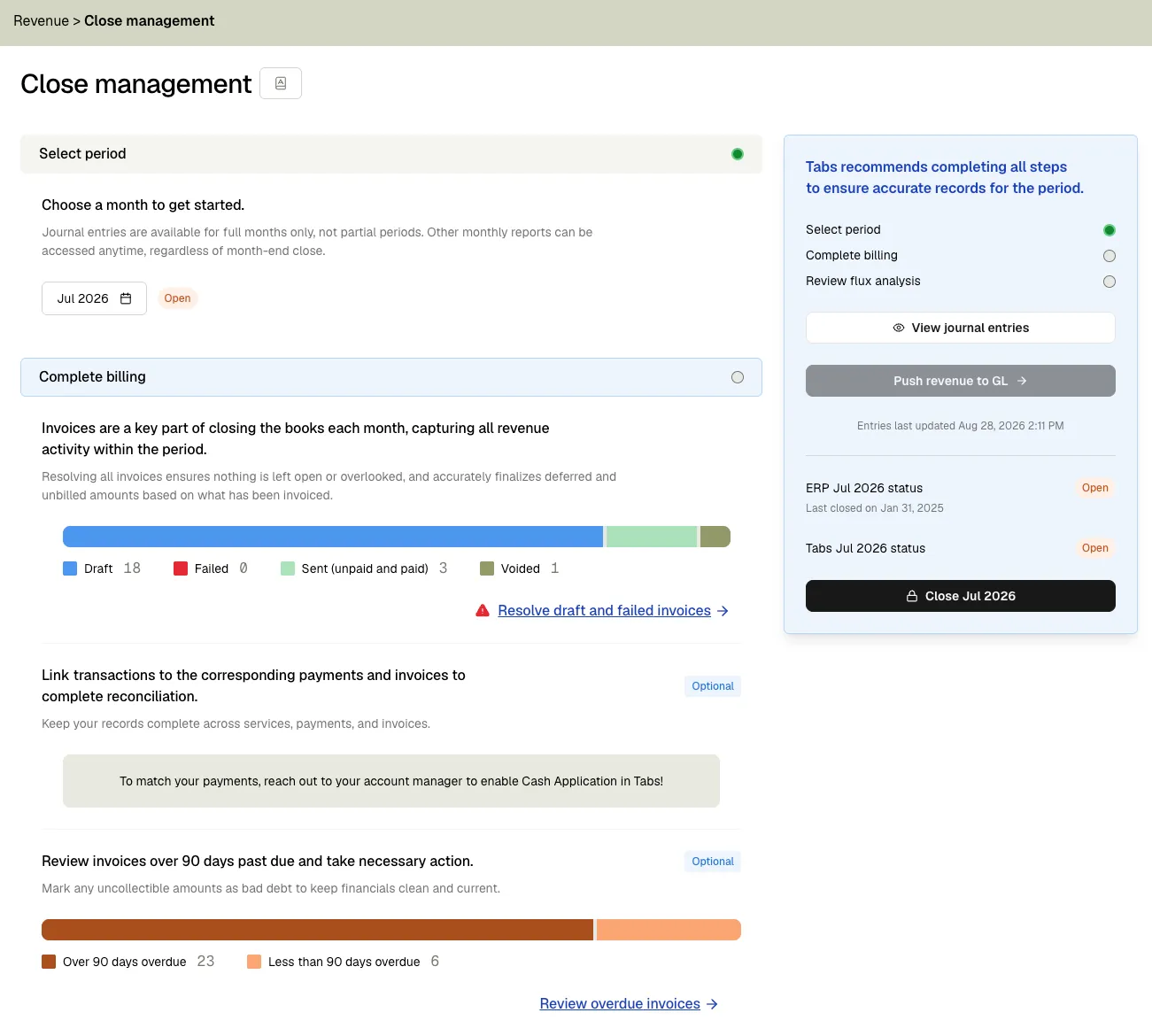
- Go to Revenue → Close Management and select the period.
- Review performance obligations and recognized amounts
- Open View journal entries and click Update entries to include the latest contract, billing, and revenue activity.
- Review journal entries. You can filter by status, type, customer, contract, product, integration item, and account.
- Review your running deferred and unbilled balances in the Deferred and Unbilled Rollforward reports
- Complete the close checklist and push draft revenue entries to your ERP, or download the CSV and post them manually.
- If you manually post your journal entries to your GL, close your books in Tabs once posted.
Update entries recalculates journal entries in Tabs; it does not push them to your ERP. Tabs generates the lines from contract activity, so you correct the underlying contract, billing, revenue, or account-mapping data rather than editing individual journal entry lines.
Review journal entries
The journal entry table includes a Last updated timestamp. Click Update entries whenever you make a correction or the table is stale.
Use the table controls to:
- Sort entries by any column
- Filter by activity type
- Search by customer or contract name
- Customize visible columns and currencies with Format settings
- Download all entries for the period as a CSV
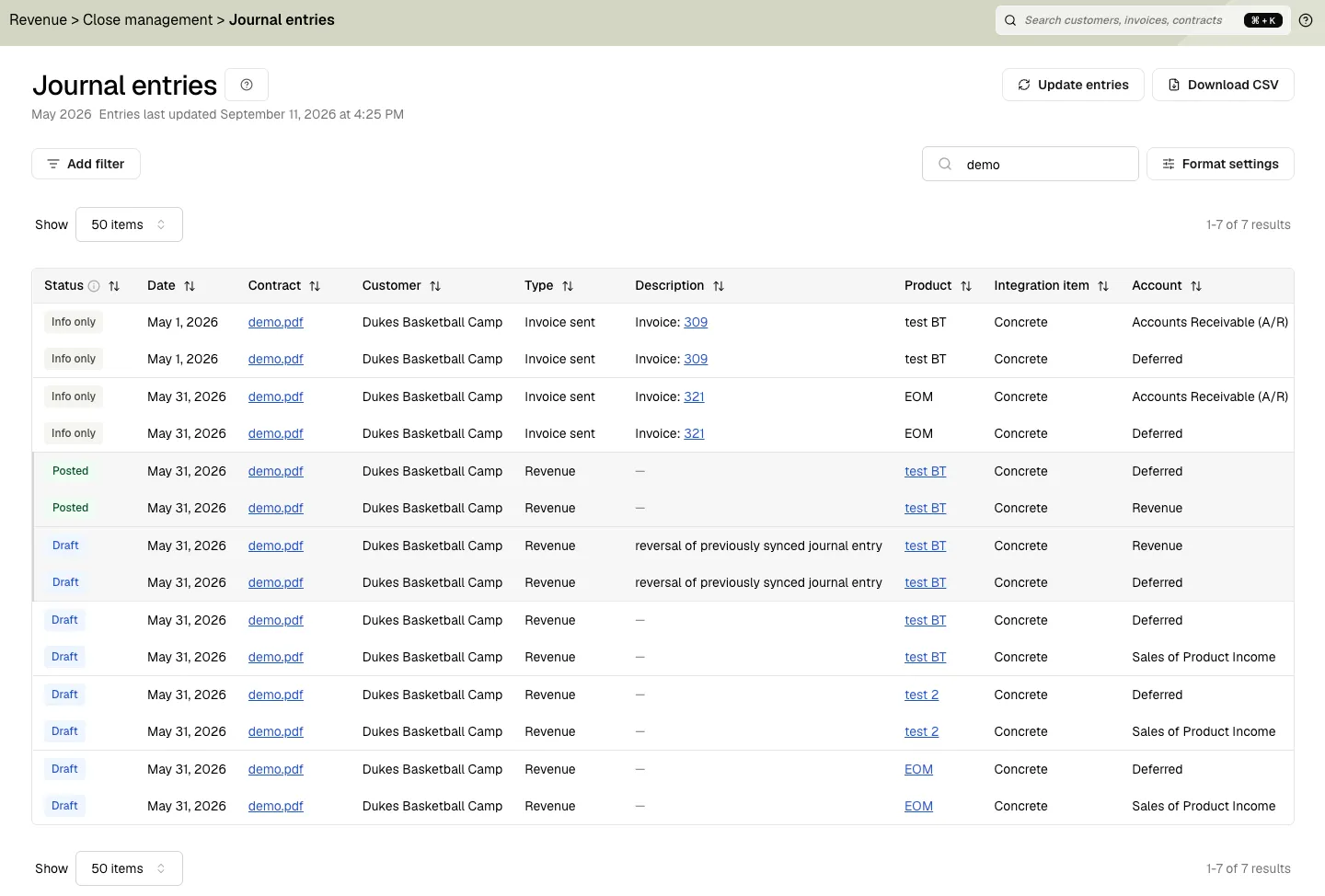
Journal entry statuses
Common activity types include invoice and credit memo activity, offsets, revenue recognition, and reversals. Offset entries reclassify balances between Deferred and Unbilled when billing and revenue recognition occur at different times. They are not duplicate invoice entries.
Reconcile deferred and unbilled balances
After resolving billing and before pushing journal entries, review the Deferred and Unbilled Rollforward reports. Open them from Revenue → Deferred rollforward or Revenue → Unbilled rollforward, or from Close Management → Rolling balances via Review Rollforward.
Rollforward summary
The summary reconciles the period using:
An AI summary at the top of the page highlights notable movements and anomalies for the period.
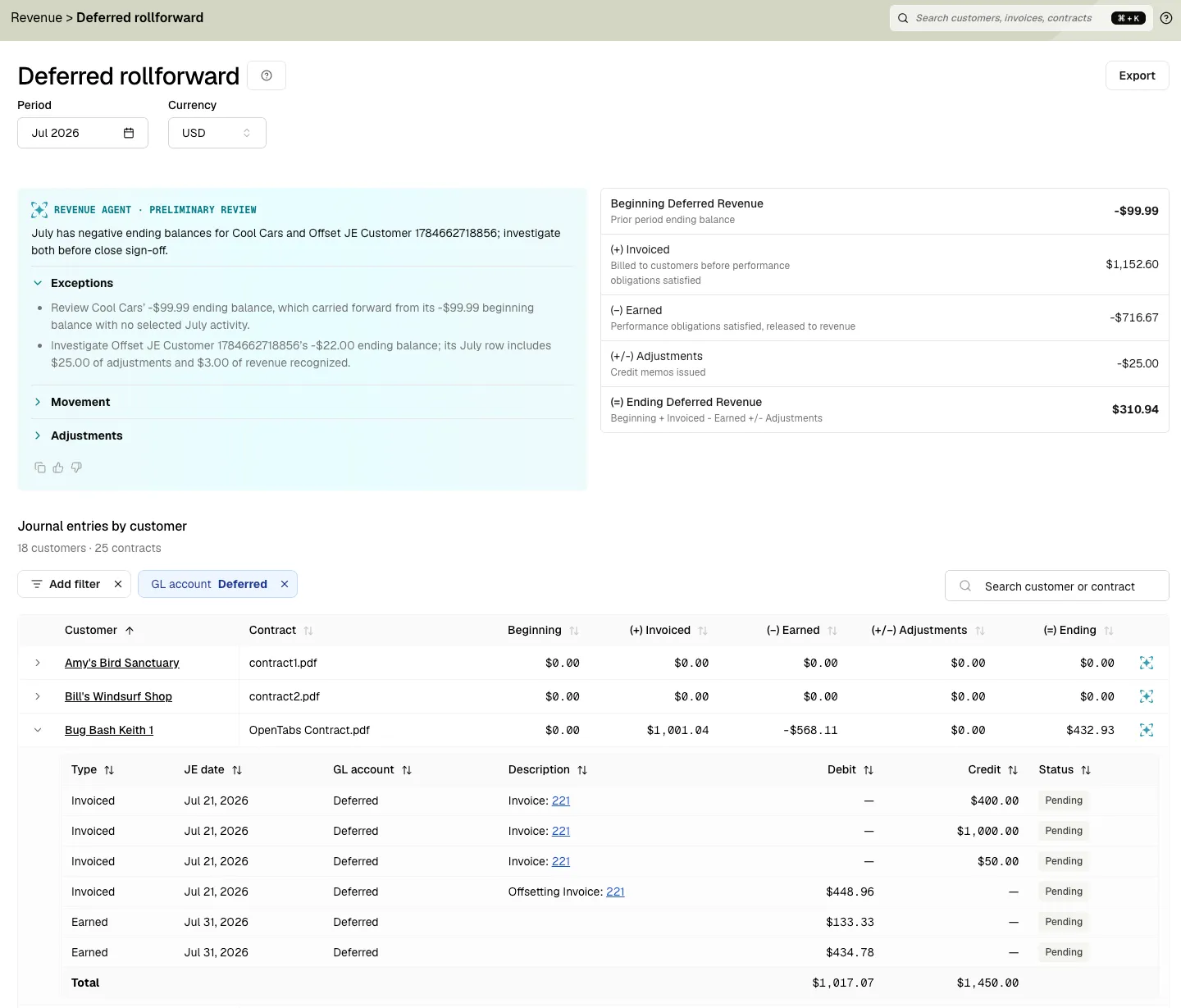
Rollforward details
The details show the same movements by customer and contract, with a total that reconciles to the period summary. Expand a contract to inspect the journal entry lines behind each movement. Each row also includes an AI summary explaining the drivers behind that customer or contract’s movement.
The report initially filters journal entries to the Deferred accounts configured on integration items. Keep the filter to investigate deferred activity, or clear it to review both sides of each entry. Filter to a customer or contract to trace unexpected activity, and use Export for close workpapers or audit support.
If the rollforward does not match expectations:
- Check the contract’s integration item.
- Check the item’s Revenue, Unbilled, and Deferred account mappings.
- Correct the source data or mapping.
- Return to the Journal Entries for the period and click Update entries.
- Reopen the rollforward and confirm the movements.
Push and close
When the close checklist is complete, push draft, non-Info-Only entries to your connected ERP. Info Only entries remain display-only because the ERP already recorded that activity.
After pushing—or manually posting the downloaded entries—close the period in Tabs. A closed Tabs period is read-only and prevents its Accounts Receivable, Deferred, Unbilled, and Revenue balances from changing.
Correct a closed period
If you find an error after pushing and closing:
- Select the period and click Reopen. This unlocks the period in Tabs only.
- Make the correction to the source data.
- Return to journal entries and click Update entries.
- Review the draft reversal of the old posted entry and the new corrected entry. Since journal entries are never deleted in Tabs, reversals are created to correct any changes.
- Click Re-Push revenue to GL to send only the new draft entries.
- Use Re-close periods to close the reopened periods again.
Reopening a period also reopens every later closed period so downstream billing and revenue schedules remain consistent. Tabs records close, reopen, and re-close actions with the user and date.
Tabs close versus ERP close
Tabs and your ERP lock periods separately:
- Tabs periods can close ahead of your ERP periods.
- Reopening a period in Tabs does not reopen it in your ERP.
- If the ERP period is locked, Tabs cannot push entries until you reopen the ERP period.
- Closing a period in Tabs does not lock the corresponding ERP period.
Rillet is the exception: Tabs takes its book close date from Rillet instead of tracking one separately. See Rillet: your ERP sets the book close date.
ERP journal entry sync
Configure which ERP accounts Tabs uses for revenue journal entries under Integrations → your ERP → Manage. Tabs pulls accounts from your ERP but does not create or modify them.
Book close date
Tabs respects your book close date. Actions that would affect a closed period — such as terminating a billing term with a date in a closed period — will fail with an error. Retrieve the current book close date via GET /v3/merchant/book-close-date.
Rillet: your ERP sets the book close date
For Rillet, the book close date is not a Tabs-side setting. Tabs reads your last closed accounting period from Rillet on every sync and stores its end date as the book close date, so the date always reflects your Rillet books. If Rillet reports no closed period, Tabs holds no book close date and treats every period as open.
Two behaviors follow from that:
- A contract or invoice change falling on or before the book close date is pushed to Rillet as an amendment dated just after the close, rather than editing the closed period directly.
- Reopening a period is done in Rillet, not in Tabs. When the close date moves earlier, Tabs regenerates the contracts and invoices whose dates fall in the reopened window so they re-sync cleanly. Tabs never locks or unlocks Rillet periods itself.
Audit trail
Tabs retains a full audit trail for close:
- Generated and submitted journal entries
- Reversals and corrected replacement entries
- Period close, reopen, and re-close actions
This supports ASC 606 disclosure and audit requirements.
Troubleshooting
Entries still show old amounts
Click Update entries to recalculate Tabs activity. If the ERP still shows the old amounts, push the new draft entries. Updating entries alone never changes the ERP.
Two entries appear for the same invoice
Check the Type column. An invoice entry and an invoice offset are expected when Tabs must reclassify Deferred and Unbilled balances. Investigate a duplicate only when both the type and amount match.
A push fails while the Tabs period is open
Check whether the period is locked in the ERP. For NetSuite, also confirm that currencies are mapped correctly and review the ERP sync error for the failed entry.
A correction creates a reversal and replacement
This is expected. Tabs preserves posted entries and creates a draft reversal plus a corrected draft entry instead of overwriting accounting history.
Related resources
- Revenue Recognition & Schedules — performance obligations and revenue schedules
- Standalone Selling Price (SSP) — ASC 606 allocation
- GL Account Mapping — item revenue accounts and system-level account mapping
- Accounting System Sync — integration items and sync behavior
- Upsert recognized revenue — API reference for recognized revenue entries
- Invoices & Integrations — invoice sync to ERP (separate from journal entries)