

About Tabs
Tabs is an AI-native revenue platform for finance teams. It ingests contracts and customer data, turns legal terms into structured billing, generates and collects invoices, recognizes revenue, and syncs everything to your ERP — on one system instead of spreadsheets and bolt-on tools.
Tabs agents automate routine work like invoice preparation, collections replies, and reconciliation. Your team stays in control with approvals and exception handling when judgment is needed. See Collections Agent for how it handles inbound email.
These docs cover two paths:
- Getting Started (this tab) — product concepts and workflows for finance and ops teams
- API Guides — implementation, integrations, and programmatic access for developers
How revenue operations flow through Tabs
Every billing operation in Tabs follows the same contract-to-cash lifecycle:
- Customers and contracts enter Tabs — via CRM sync, e-signature, email ingest, or API. CRM customers often arrive before their contracts; use Confirm Customer to link deals to the right account.
- Products and billing terms are configured — reusable Product Catalog entries define what you sell; billing terms on each contract define pricing, cadence, and schedule for that customer.
- Invoices are generated and sent — billing terms create draft invoices on schedule; sent invoices sync to your CRM, ERP, and tax providers.
- Payments are collected and applied — Tabs Pay, Stripe, Plaid, and manual recording settle invoice balances and sync cash to your ERP.
- Revenue is recognized and closed — performance obligations and revenue schedules decouple recognition from billing; month-end close posts journal entries to your ERP.
- Reporting and integrations tie it together — AR, forecasting, and commercial metrics draw from the same data; Integrations connect CRM, ERP, payments, and tax.
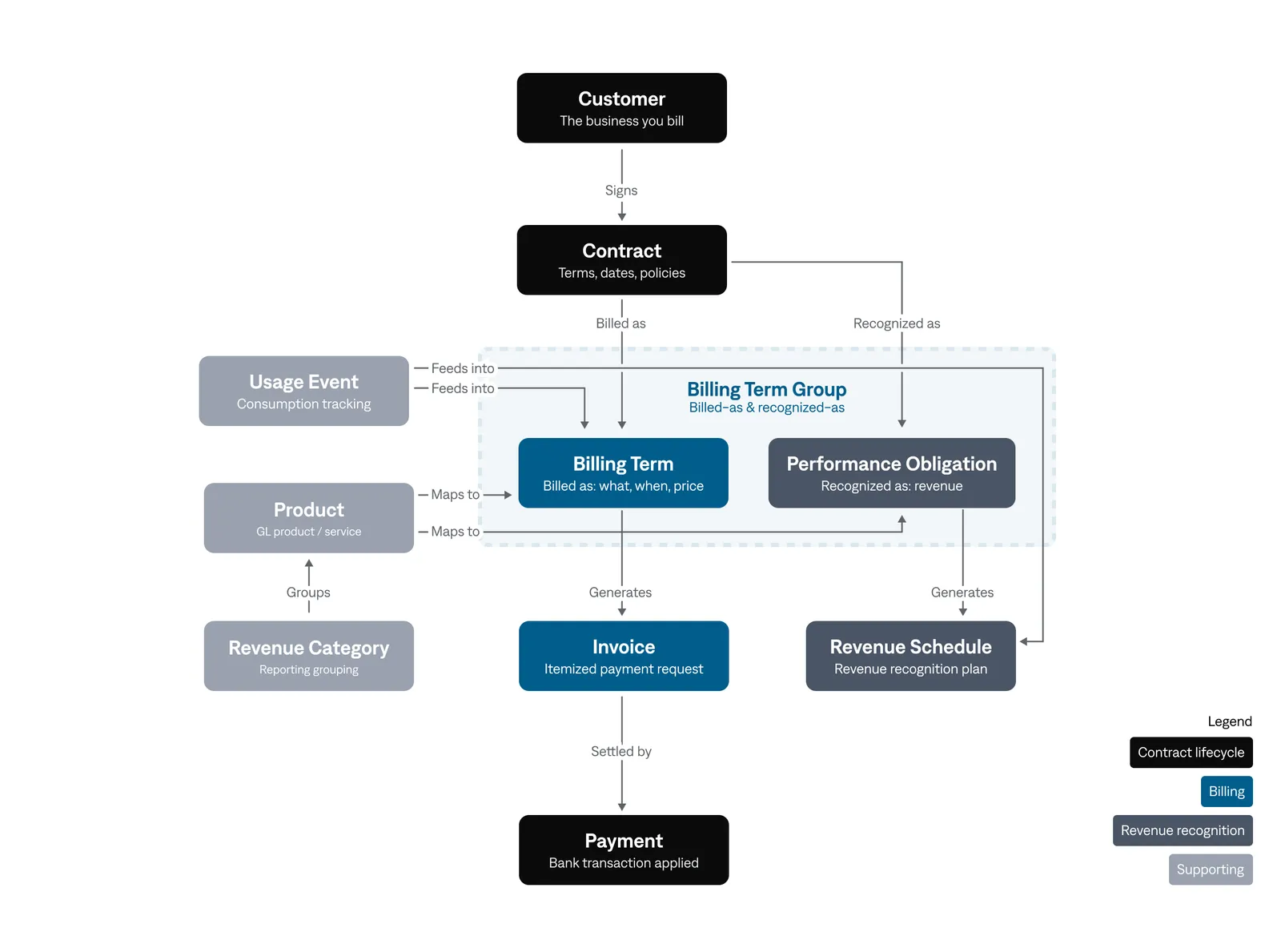
For entity definitions and a worked example, see Tabs data model.
Explore Getting Started
Key concepts
Tabs is the source of truth for invoices. Sent invoices, payments, and revenue journal entries flow from Tabs to your ERP, and edits made to a Tabs-sent invoice in your ERP do not come back. Some activity does flow the other way: payments applied in your ERP sync back to Tabs, as does an ERP-side credit memo application, which arrives as a payment. See Integrations for sync behavior and ERP & Account Mapping for setup.
CRM customers arrive before contracts. HubSpot and Salesforce syncs create customer records first; contract sync links closed-won deals to those accounts. If a contract lands on the wrong customer, use Confirm Customer before processing.
Build with the API
Further reading
- Tabs data model — entity definitions and relationships
- Integration Overview — CRM, ERP, payments, and tax architecture
- Develop with the Tabs API — authentication, endpoints, and rate limits